Essential mouse and pc-keys

You need to know the following mouse shortcuts to work with lessons.
All shapes include an anchor, a solid white or solid red circle.?? Solid red means the anchor location holds a note and can be listened to.?? When solid white the anchor location is empty. You can create a note there, or move it.?? Scales and chords are laid out around the anchor.?? Move the anchor to move any shape.
Experiment with the mouse shortcuts below by clicking the eye-ear icon (indicates interaction(s) are available. This one is very simple. It just allows clearing the guitar during experiments.

- left-drag the anchor to move it.?? Or CTL-left-click the new location for the anchor.
- left-click to create a note at an empty fret/string or piano key.
- left-click to delete a note.
- right-click to select a note. A note can be selected multiple times.
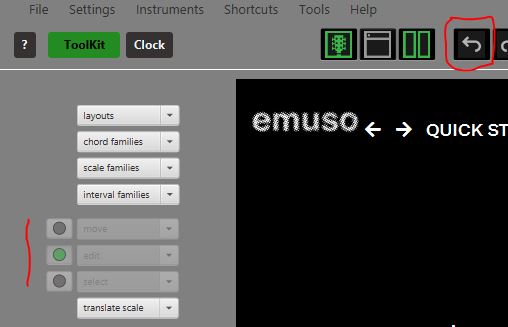
- to unselect, type “u” or click the “undo” icon, the left arrow below.?? You can’t redo this)
The anchor changes if emuso recognises a chord or scale. This behaviour can be turned off (uncheck “Analyse construct for root or tonic in invent” in the “Settings” menu).?? We recommend it is turned on.
In lessons, the move, edit, and select dropdowns are disabled when the Toolkit is showing.